.png)
Relationship Types (Clients, Prospects & Contacts)
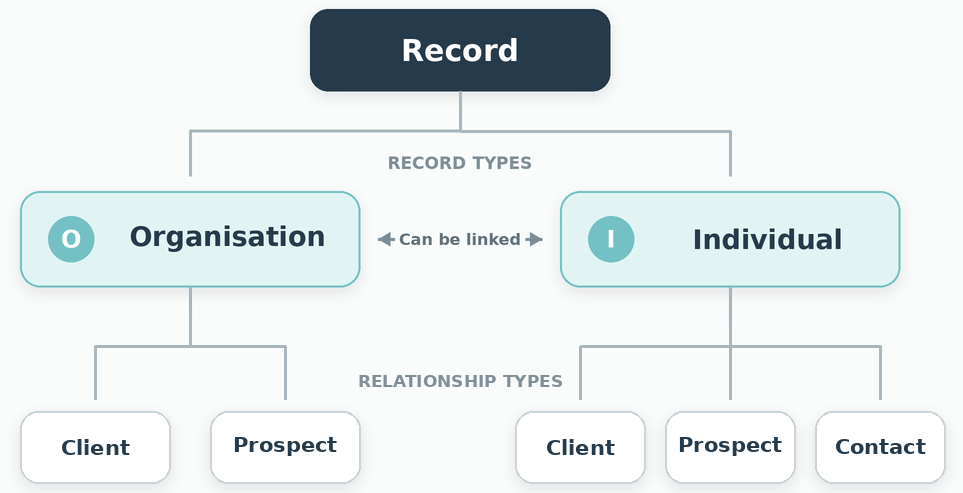
Understanding records in PracticeFlow
A record holds the information about one Organisation or Individual.
PracticeFlow holds two record types, shown on separate tabs in the main window:
- Organisations: business entities such as limited companies, LLPs, sole traders, partnerships and charities, typically receiving services such as VAT, Payroll, Accounts and Corporation Tax.
- Individuals: people, including personal tax clients and people associated with Organisations, such as directors, PSCs or employees.
Each record also has a relationship type, describing how that Organisation or Individual relates to your practice:
- Client: Organisation or Individual
- Prospect: Organisation or Individual
- Contact: Individual only
When adding a new Organisation or Individual, the relationship type defaults to Client unless you specify otherwise. You can also set the relationship type when importing data using the Organisation and Individual import CSV templates.
For example, a limited company may be a Client, while its director has a separate Individual record marked as a Contact. If you also manage the director’s personal tax return through that Individual record, their relationship would be Client.
Client
Use Client for Organisations or Individuals you provide services to.
Smart Tasks templates only create tasks automatically for records with a Client relationship.
Active Clients count towards your subscription’s client limit. See What Counts Towards Your Client Limit?
Prospect
Use Prospect for potential clients. Both Organisations and Individuals can be Prospects.
Prospects do not generate Smart Tasks or count towards your client limit. Change their relationship to Client when they become a client.
Contact
Use Contact for people you need to record who do not require their own Smart Tasks. This relationship type is available only for Individuals.
Contacts do not generate Smart Tasks or count towards your client limit.
Keeping Individuals separate from Organisations allows each person to be linked to one or more Organisations, and each Organisation to be linked to multiple people. These links also support the Client Portal and e-sign.
Examples of how to use Contacts:
- General contacts: store details of a person you want to keep in touch with, whether or not they are linked to an Organisation.
- Directors or PSCs: record a person as a Contact while the Organisation is your Client.
- Client Portal access: a director, employee or other person at a client Organisation can be set up as a linked Individual with a Contact relationship. They do not need to be marked as a Client to receive portal requests, upload or download documents, complete forms or sign documents. Use Client if you also need onboarding or other Smart Tasks for that Individual.
- Sole trader personal details: use a linked Individual record to hold information such as their date of birth or National Insurance number, while managing their services through the Sole Trader Organisation. See Setting Up Sole Traders & Self-Assessment Clients for guidance.
Manual tasks
Although only Clients generate Smart Tasks automatically, one-off and recurring tasks can be created manually for any relationship type, including Prospects and Contacts.