.png)
Triggering Smart Tasks
Smart Tasks are triggered automatically based on the minimum amount of information being available as shown by the table below:
| Smart Task | Minimum Required Information |
| Accounts | Company number (auto-triggers from Companies House data) |
| AML Risk Assessment | Risk level & last risk assessment date. |
| Bookkeeping | Bookkeeping frequency & start-from date |
| CIS Return | CIS start-from date |
| Confirmation Statement | Company number (auto-triggers from Companies House data) |
| Engagement Letter | Auto-triggers if "Engagement Letter Date" field is blank |
| MTD IT Quarterly Update | MTD IT start date & “Tax return required” set to On |
| MTD IT Final Declaration | MTD IT start date & “Tax return required” set to On |
| Payroll | Payroll frequency (monthly or four-weekly) & start-from date |
| Self-Assessment Return | "Tax return required" set to On & trading start date |
| Tax Return (Organisation) | Company number (task created using available dates) |
| VAT Return | VAT registration date & VAT quarters (e.g. Jan/Apr/Jul/Oct) |
Note: In the absence of a Company registration number, the following fields are required to be entered manually:
- Trading start date
- Year-end date
If you click on a client, this will bring up a settings panel on the right-hand side of the screen. If you scroll down, below general details and settings, you will find tasks such as VAT and payroll. Look for the lightning icons against specific fields. This indicates the minimum information required to generate Smart Tasks.
Example below:
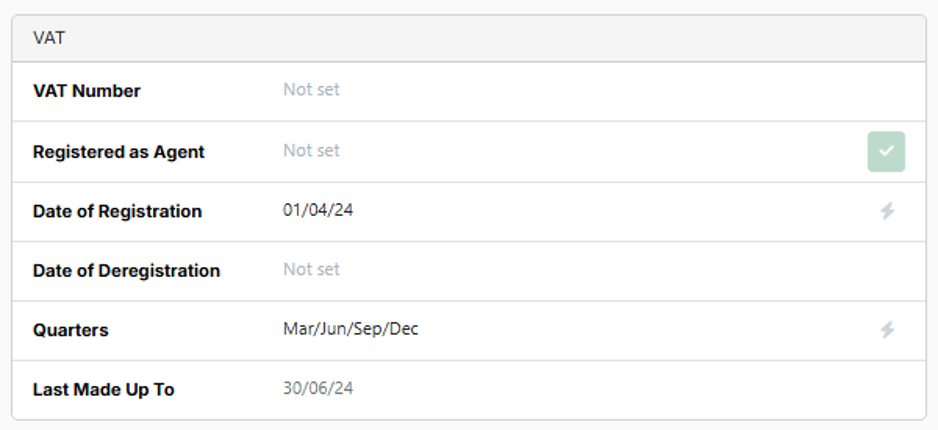
If this information has not already been completed by the client import process, you can add it manually and once saved the relevant smart task will be created. You can see this by returning to the Tasks tab.